Daily regional rail transit across Lombardy presents a demanding operating environment for mobile software. Commuters navigate high-speed curves, switch between cellular base stations, and pass through subterranean and alpine tunnels where satellite GNSS signals and cellular data disappear entirely. Simultaneously, many passengers experience motion discomfort when attempting to read on moving rolling stock.
As our final project for the Design and Implementation of Mobile Applications (DIMA) course in the Master of Science in Computer Science and Engineering at Politecnico di Milano—developed in academic collaboration with Trenord(opens in a new tab), one of the biggest railway companies in Italy and the largest regional rail operator in Lombardy—my teammates Tommaso Morganti, Luca Suzani, and I set out to architect and build Trenord Infotainment (GitHub repository(opens in a new tab)). Our objective was to create a modern, offline-first mobile companion that bridges the gap between raw railway telematics, passenger wellbeing, and resilient onboard media.
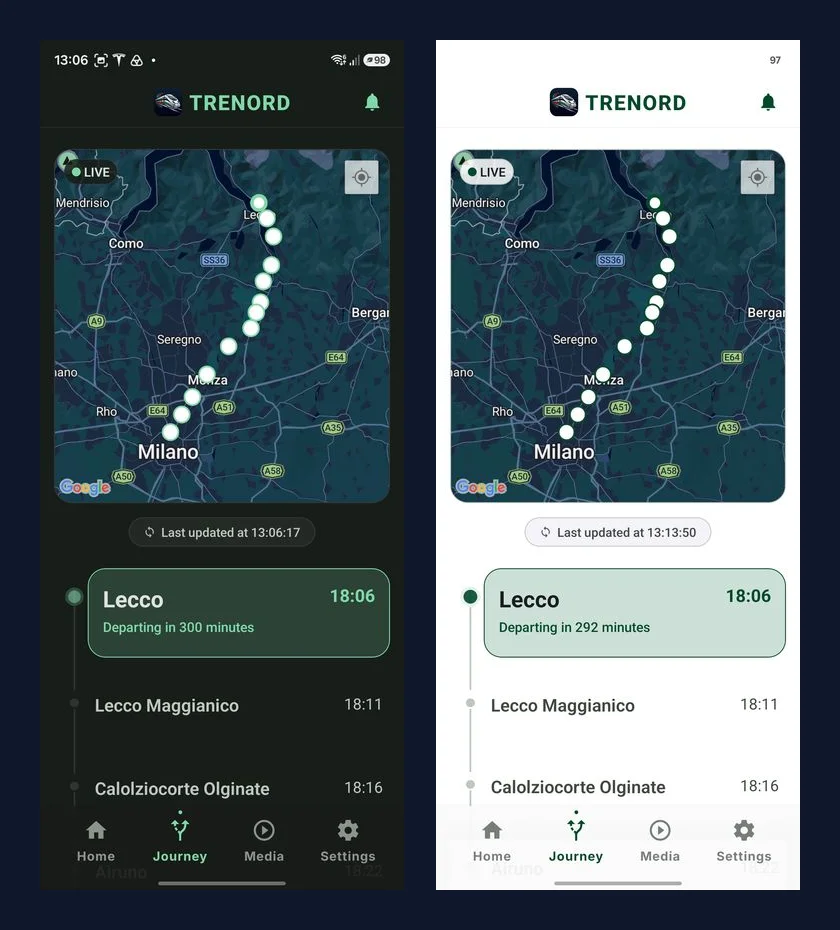
The Transit Computing Challenge
Modern mobile applications typically assume continuous, low-latency internet connectivity. In regional transit, however, that assumption routinely fails:
- Intermittent Connectivity & Tunnel Blackouts: Rail corridors throughout Lombardy pass through extensive cuttings and tunnels. Apps that gate user interactions behind blocking network requests quickly become unresponsive.
- Kinematic Discomfort (Kinetosis): Reading or interacting with handheld screens while rolling stock yaws and accelerates causes a sensory conflict between the vestibular system (which feels vehicle movement) and the ocular system (which sees a stationary phone screen).
- Information Fragmentation: Delay estimations, platform reassignments, destination weather, and transfer options are often spread across separate portals or noisy station announcements.
- Form Factor Diversity: Passengers carry diverse devices, from compact smartphones to wide tablets and iPads mounted on seatback trays, requiring adaptive spatial layouts rather than stretched mobile interfaces.
To address these constraints, we designed Trenord Infotainment around three architectural pillars: deterministic offline resilience, hardware-accelerated kinematic comfort, and responsive multi-column layout bifurcation.
Seamless Onboarding & Ticket Verification
The journey starts at the ticket gate. Rather than requiring users to manually configure their trip details, Trenord Infotainment supports two onboarding pathways: optical scanning of physical ticket 2D barcodes / PNR booking codes, or quick entry of a numerical train code (e.g. 24869).
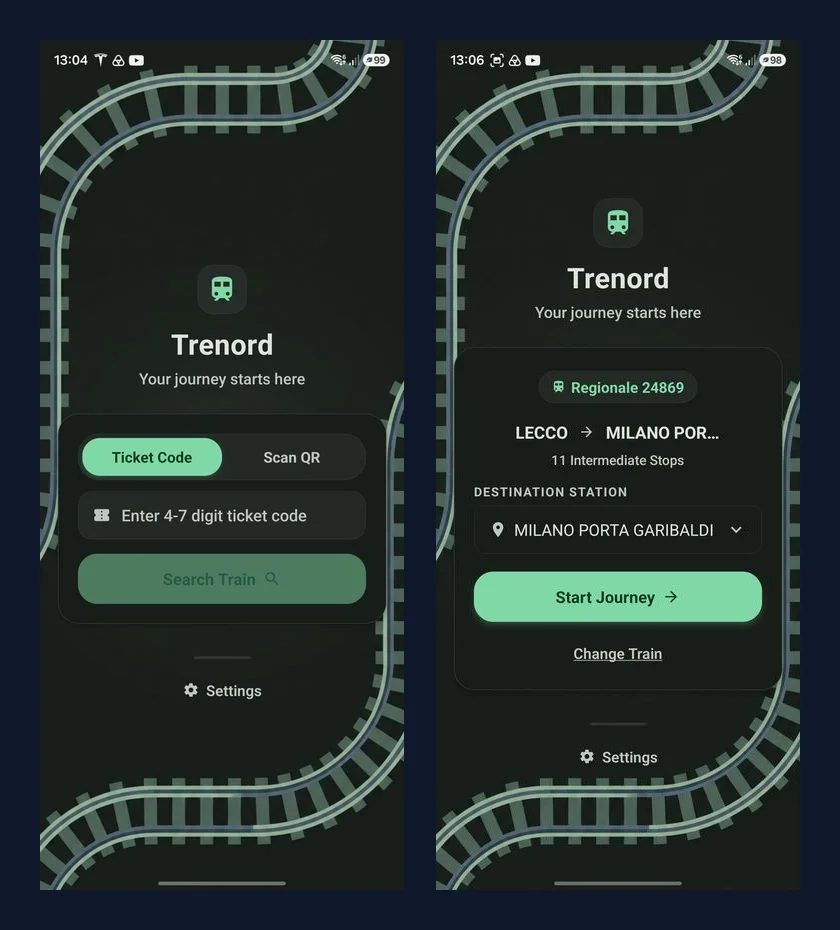
Upon code submission, the client initiates an authenticated handshake with the Trenord timetable service, automatically hydrating:
- The ordered sequence of transit stations with scheduled and estimated arrival times.
- Station dwell durations, track platform assignments, and planned transfers.
- Geospatial track coordinates to draw the complete railway polyline.
Once hydrated, this journey contract is stored locally in device storage, ensuring that passengers never lose their active trip context even if connectivity drops seconds later.
Live Railway Telemetry & Tunnel Dead-Reckoning
Tracking a train’s real-time position requires combining network telematics with local device sensors. When satellite visibility is clear, the app samples GNSS fixes via high-frequency location streams.
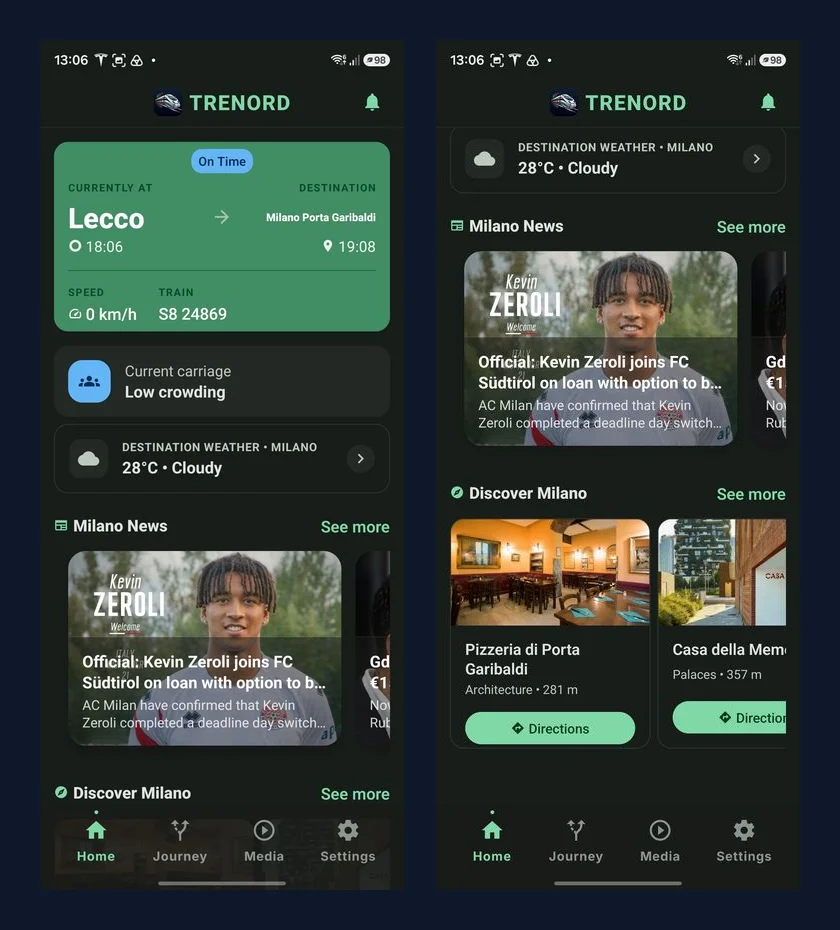
Raw GPS data in moving trains is notoriously noisy due to metallic carriage shielding and multi-path reflections. To produce smooth, jitter-free speedometer telemetry, we process raw velocities through an Exponential Moving Average (EMA) filter:
with a smoothing factor of .
Surviving Tunnel Blackouts
When rolling stock enters a tunnel, GNSS fixes freeze or drop out entirely. Standard transit applications fail in this scenario, displaying frozen coordinates or spinning loaders.
Trenord Infotainment implements a dead-reckoning fallback state machine:
- Signal Loss Detection: If no fresh GNSS fix arrives within a 5-second sampling window, the system switches from Satellite Mode to Dead-Reckoning Mode.
- Schedule Interpolation: The engine queries the pre-cached timetable, calculating expected position along the railway polyline based on elapsed run time between the previous scheduled departure and the upcoming station arrival.
- Seamless Re-acquisition: As soon as the train exits the tunnel and GNSS confidence is restored, the position smoothly snaps back to physical telemetry without jumping or resetting the user interface.
Mitigating Motion Sickness: The 60 FPS Anti-Kinetosis Engine
Reading text on a vibrating, swaying train frequently triggers kinetosis (motion sickness). This occurs because your inner ear feels the lateral centrifugal force as the train rounds a bend, but your eyes fixate on a phone screen that appears completely motionless relative to your hands.
To solve this, we built a hardware-accelerated vehicle motion cue overlay.
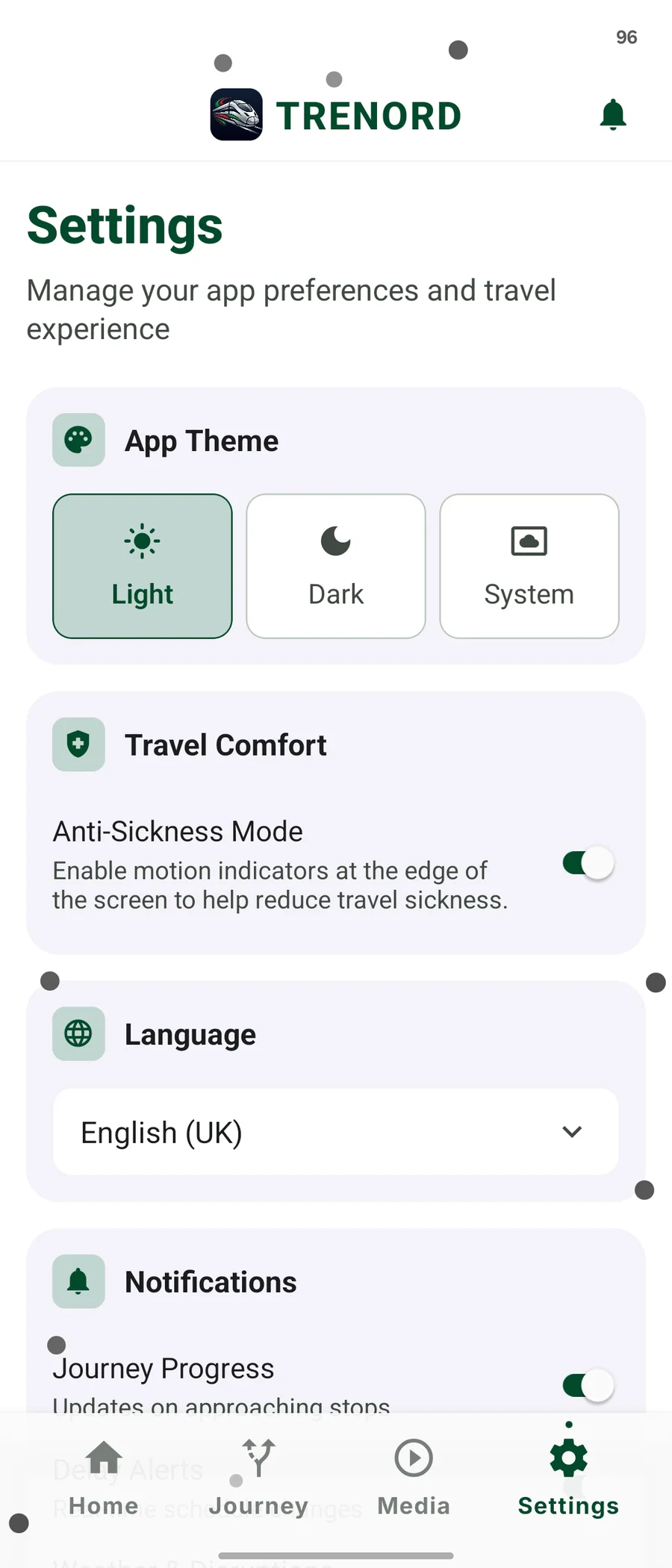
The system renders 40 unobtrusive, edge-aligned inertial particles along the perimeter of the screen. As the train sways, accelerates, or enters a curve, these particles smoothly drift in the opposite direction of the vehicle’s acceleration vector, providing the commuter’s peripheral vision with an intuitive artificial horizon.
Lock-Free UI Worklets
Running continuous trigonometric calculations on the JavaScript thread would introduce frame drops and degrade UI responsiveness. Instead, our motion engine executes entirely on the native UI thread using React Native Reanimated worklets:
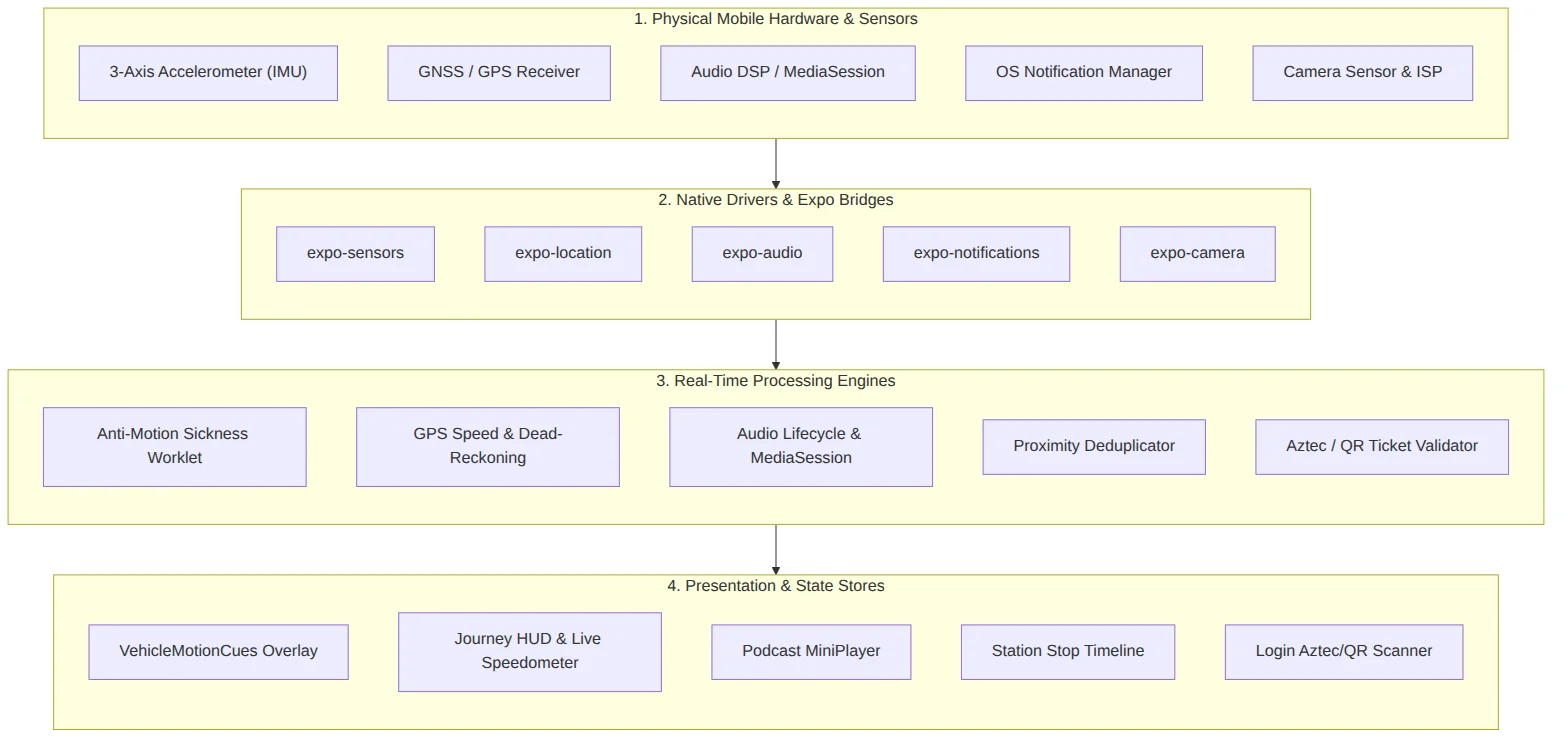
- The device accelerometer is sampled at display refresh rate (~60 Hz / 120 Hz) via
useAnimatedSensor(SensorType.ACCELEROMETER). - A low-pass filter () separates the static gravitational vector () from dynamic vehicle acceleration.
- The resulting linear acceleration vector drives particle displacement across the screen boundary with smooth coordinate wrapping and depth fading.
- Because the math runs inside a worklet, the overlay maintains a rock-solid 60 FPS without consuming a single cycle on the main JavaScript event loop.
Complementing the motion cues, we also built a Shake-to-Report safety listener. If a sudden severe deceleration or physical shaking occurs (, ), the application automatically opens the onboard incident reporting sheet, enabling passengers to report delays, maintenance issues, or medical emergencies immediately.
Zero-Latency Offline Arcade & Media Hub
Streaming video or loading heavy web pages over congested train Wi-Fi or intermittent LTE is frustrating. We designed the entertainment subsystem to be self-contained and battery-friendly.
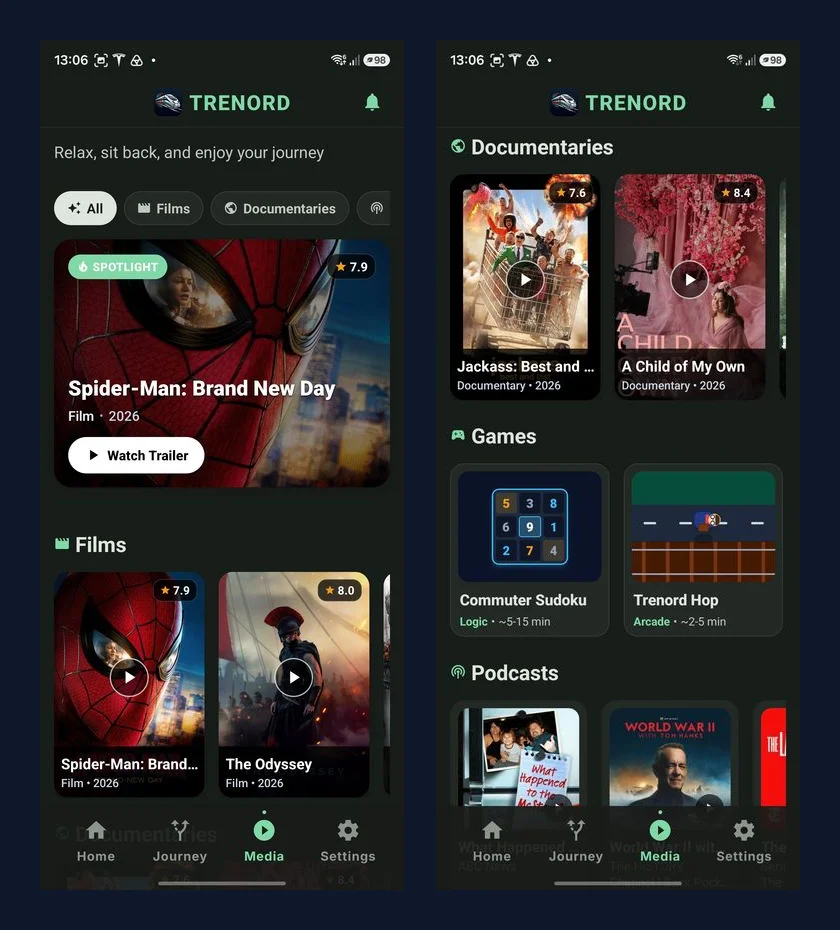
The media hub combines curated regional transit culture, news, and entertainment:
- Background Audio Subsystem: Built with
expo-audio, featuring persistent lockscreen MediaSession controls, variable speed playback (1x–2x), and chapter scrubbing that survives backgrounding and app switches. - Commuter Sudoku: A full-featured, zero-latency 9x9 puzzle game with multiple difficulty levels, pencil note-taking, error highlighting, game timers, and automatic board persistence.
- Trenord Hop (60 FPS): A custom retro arcade endless runner featuring pixel art rolling stock, track crossing mechanics, coin collection, and haptic feedback via
expo-haptics.
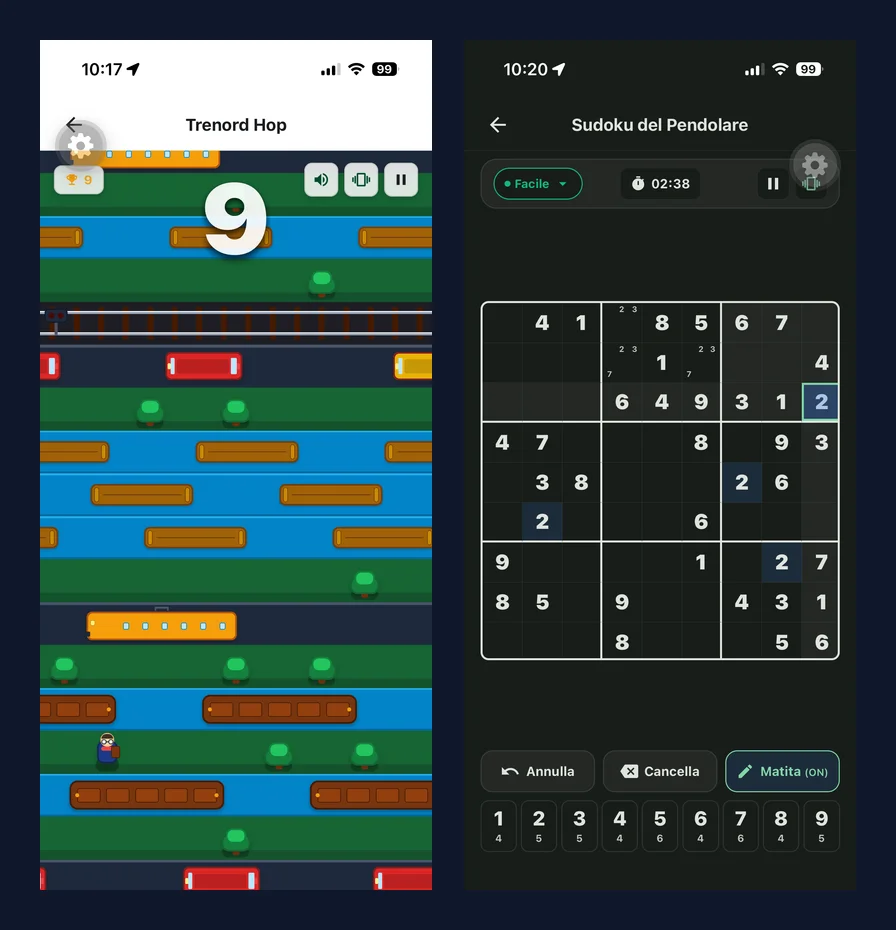
Both games execute 100% locally with zero external network requests, offering immediate entertainment regardless of network state.
Destination Intelligence & Local Insights
As the train approaches its destination, the app transitions into an environmental and local intelligence hub:
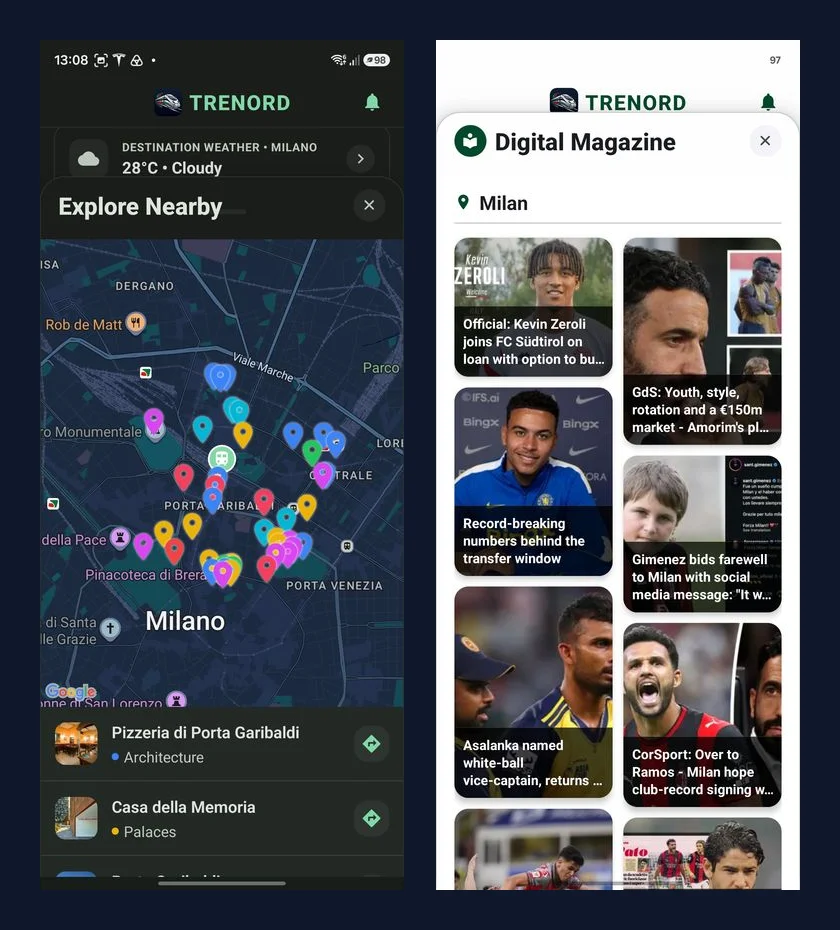
- Hyperlocal Weather & Air Quality: Real-time ambient temperature, precipitation forecasts, and European Air Quality Index (AQI 1–500) gauges for the arrival city.
- Interactive POI Map: An interactive exploration sheet featuring categorized cultural landmarks, museums, and historical architecture within walking distance of the terminal.
- Digital News Magazine: A masonry-grid article reader surfacing curated municipal, regional, and cultural headlines relevant to the destination.
- Proactive Alerts: Background notifications informing passengers of approaching transfer stops, platform updates, and arrival countdowns.
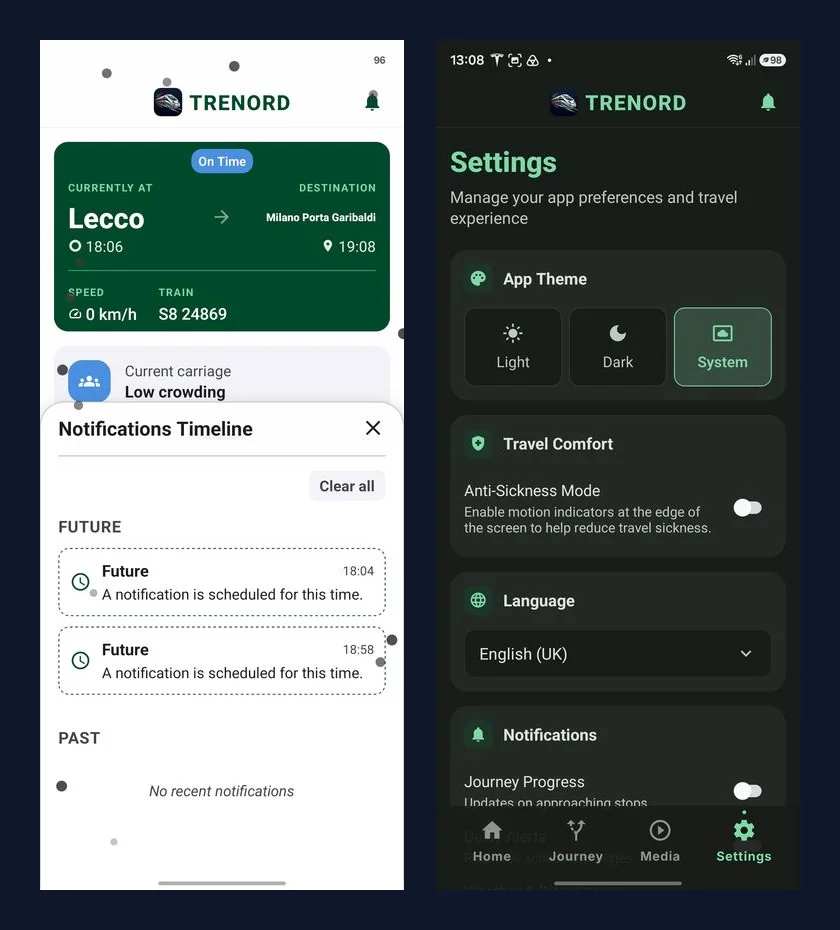
Universal Tablet Bifurcation (iPad Support)
Commuters on intercity and regional routes frequently travel with tablets and iPads. Instead of stretching phone-proportioned lists across wide screens or maintaining separate codebase forks, Trenord Infotainment adopts render-time layout bifurcation:
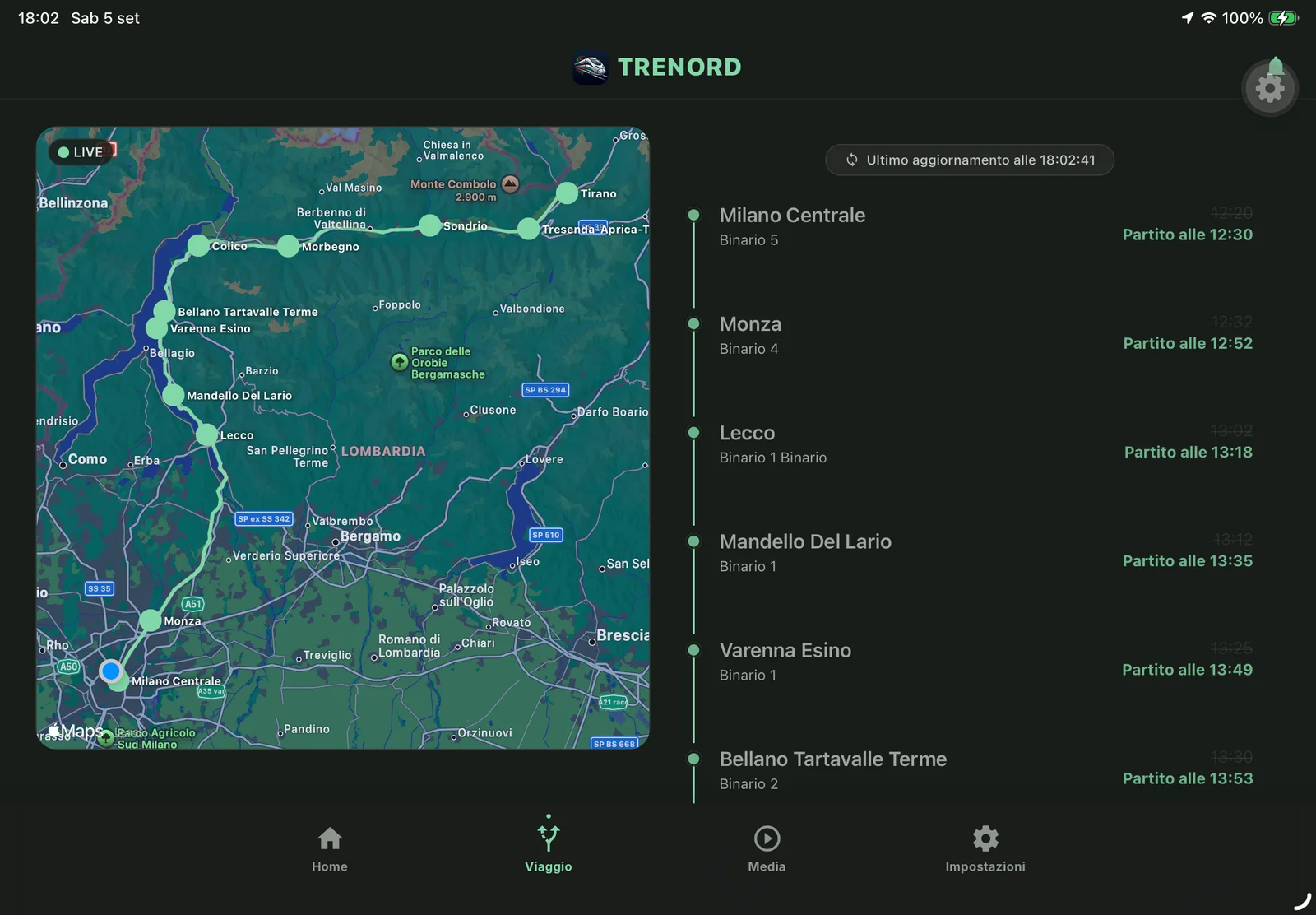
When the viewport width meets the tablet threshold ():
- The Journey Screen automatically splits into a simultaneous two-column master-detail layout: the OpenStreetMap railway track polyline remains pinned on the left, while the station stop timeline, delay badges, and carriage occupancy indicators render on the right.
- The Home Dashboard expands into concurrent telemetry telemetry gauges and horizontal discovery carousels.
- Modal dialogs enforce maximum width constraints (), preventing excessive line lengths and keeping touch targets ergonomic.
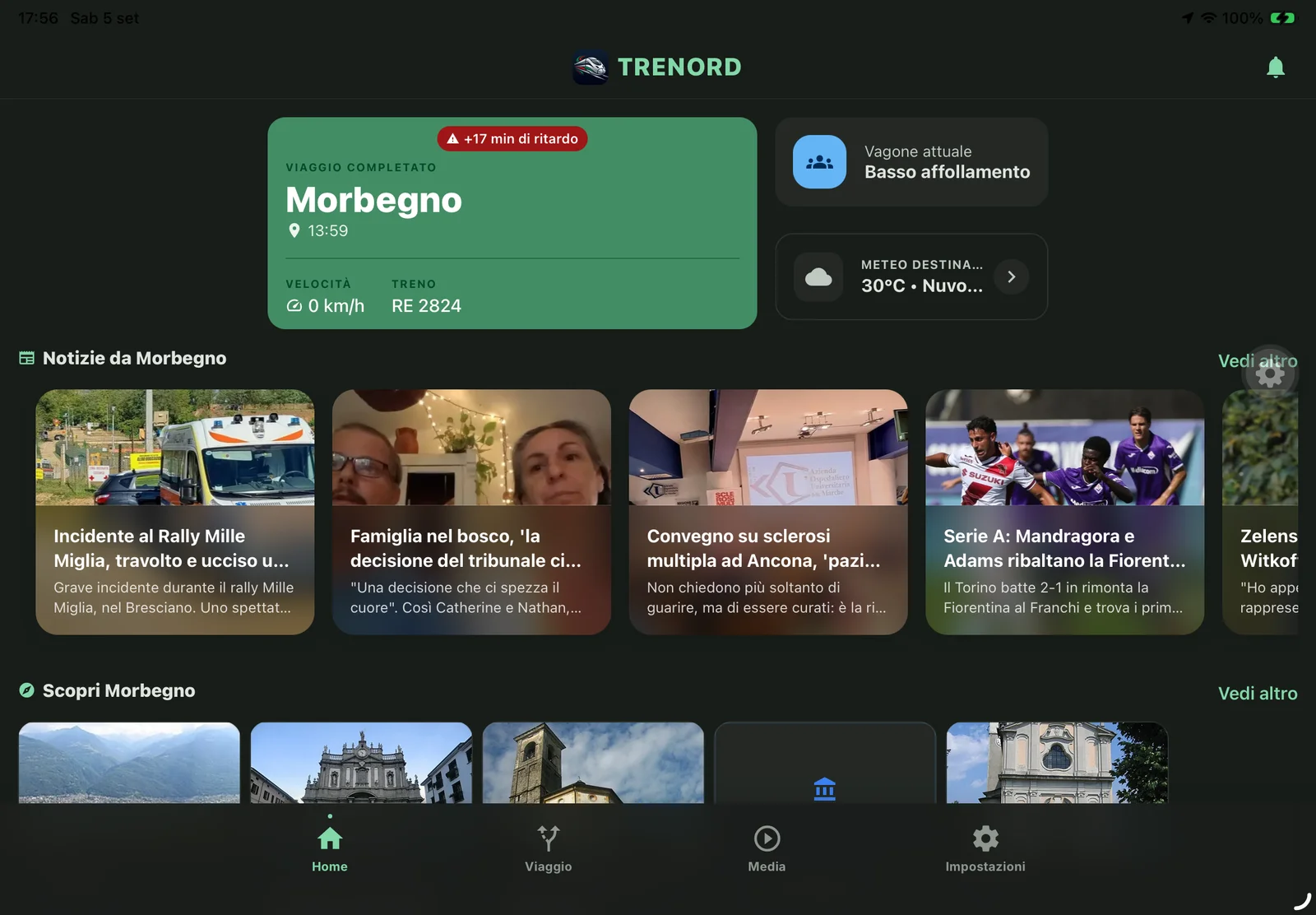
Because this bifurcation happens purely at the presentation layout layer, domain state, audio playback, and active game sessions continue uninterrupted across device rotation and window resizing.
System Architecture & Verification Rigor
Under the hood, Trenord Infotainment follows a decoupled C4 container architecture engineered for predictability and testability:
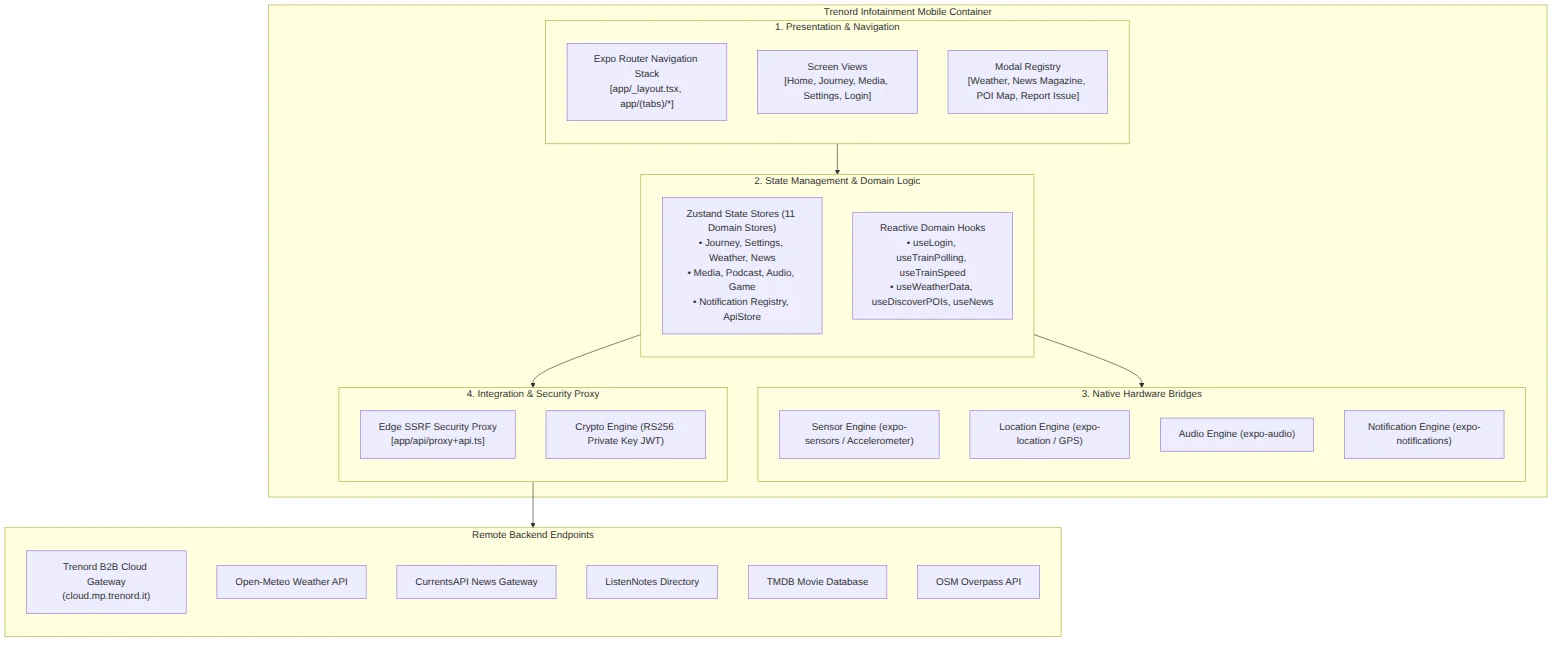
- Presentation Layer: Expo Router v5 file-based routing with strict route guards enforcing ticket hydration before granting access to journey features.
- State Management: 11 focused Zustand 5 domain stores (Journey, Weather, News, Media, Audio, Games, Settings, etc.) backed by asynchronous JSON storage.
- Atomic Session Teardown: An orchestrated
rootResetaction cascades across all domain stores upon trip completion, clearing active telemetry while preserving passenger preferences and theme settings. - Security & Proxying: Edge proxy routing with strict host allowlisting protects against SSRF vulnerabilities, while B2B API requests utilize RS256 Private Key JWT assertions with clock-skew compensation.
Technology Stack & Engineering Specifications
| Dimension | Technology & Version | Architectural Role |
|---|---|---|
| Mobile Runtime | React Native 0.83.10 / Expo SDK 55 | Modern mobile application framework running the React Native New Architecture |
| Language | TypeScript 5.9 | Full strict typing across models, API payloads, state stores, and component props |
| State Management | Zustand 5 + AsyncStorage | 11 decoupled domain state stores with atomic JSON persistence and session resets |
| Navigation | Expo Router v5 | File-based hierarchical navigation, tab shells, and slide-sheet modals |
| Kinematics & UI | React Native Reanimated 3 | 60 FPS lock-free UI thread worklets driving anti-kinetosis particle vectors |
| Hardware Sensors | expo-sensors + expo-location | 3-axis accelerometer IMU streaming and high-frequency GPS speedometer fixes |
| Audio Subsystem | expo-audio | Decoupled background playback with OS lockscreen MediaSession sync |
| Native Device Bridges | expo-camera, expo-haptics, expo-notifications | Optical barcode ticket onboarding, tactile feedback, and proximity alerts |
| Testing Framework | Jest 29 + React Native Testing Library + fast-check | 142 test suites (921 tests), property-based EMA tests, and accessibility checks |
| Cloud & APIs | Edge SSRF Proxy + OAuth 2.0 (RS256 JWT) | Trenord B2B services, OpenStreetMap polylines, Open-Meteo, CurrentsAPI, Listen Notes |
| Internationalization | react-i18next | 100% bilingual parity across all user-facing strings (Italian & English) |
Testing Pyramid & Quality Gates
To ensure stability across all physical device scenarios, we instituted an exhaustive automated verification strategy. The test baseline includes 142 test suites comprising 921 passing unit tests with comprehensive line and branch coverage:
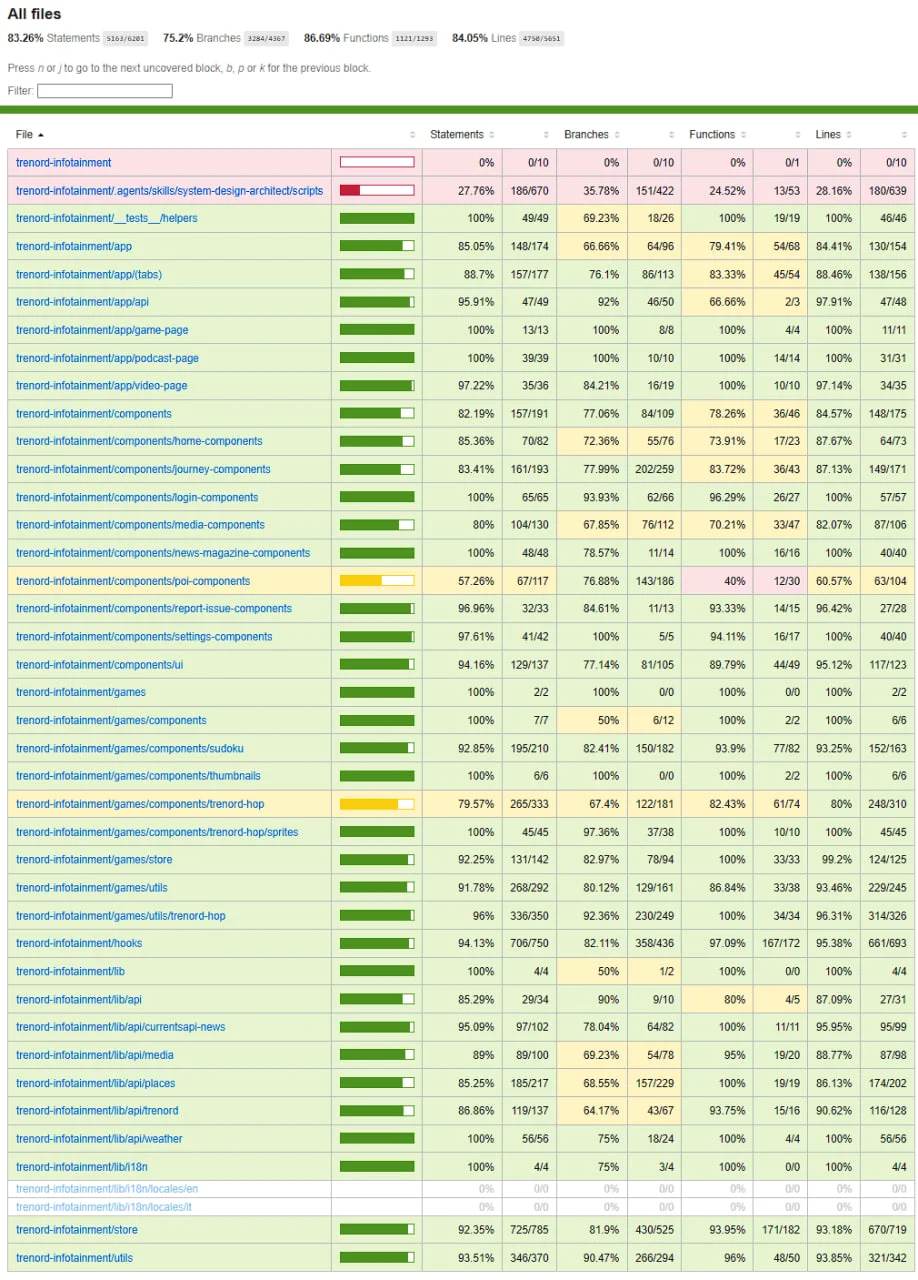
Our test suite covers:
- Kinematics & Math: Property-based testing with
fast-checkto verify that sensor EMA filters converge monotonically and coordinate double-modulos never produce out-of-bounds rendering. - State Transitions: Exhaustive testing of dead-reckoning state machines, audio lifecycle transitions, and ticket hydration guards.
- Accessible UI: Snapshot and interaction tests with React Native Testing Library verifying semantic accessibility labels and minimum 44px touch targets.
Reflections & Takeaways
Building Trenord Infotainment for the Design and Implementation of Mobile Applications exam at Politecnico di Milano in collaboration with Trenord was an incredible engineering journey. Working with real-world operational insights from Trenord—whose transport network connects hundreds of thousands of commuters daily across Lombardy as the region’s premier rail carrier—pushed us to look beyond conventional CRUD app development and tackle the real physics of mobile computing: noisy sensor hardware, intermittent cellular corridors, battery constraints, and physical human ergonomics.
Designing systems for transit requires treating connectivity as a luxury rather than an assumption. By pairing local-first state persistence with native UI worklets and responsive layouts, it is possible to build software that feels fast, reliable, and genuinely helpful—even in the middle of a mountain tunnel.
Special thanks to my teammates Tommaso Morganti and Luca Suzani for the stellar collaboration, to the Trenord engineering team for the domain context and collaboration, and to the faculty at Politecnico di Milano for encouraging deep system engineering and polished human-centered design.
The complete codebase, documentation, and architecture specifications are open-source on GitHub(opens in a new tab).